
SQL Query Lifecycle: From SQL Text to Results
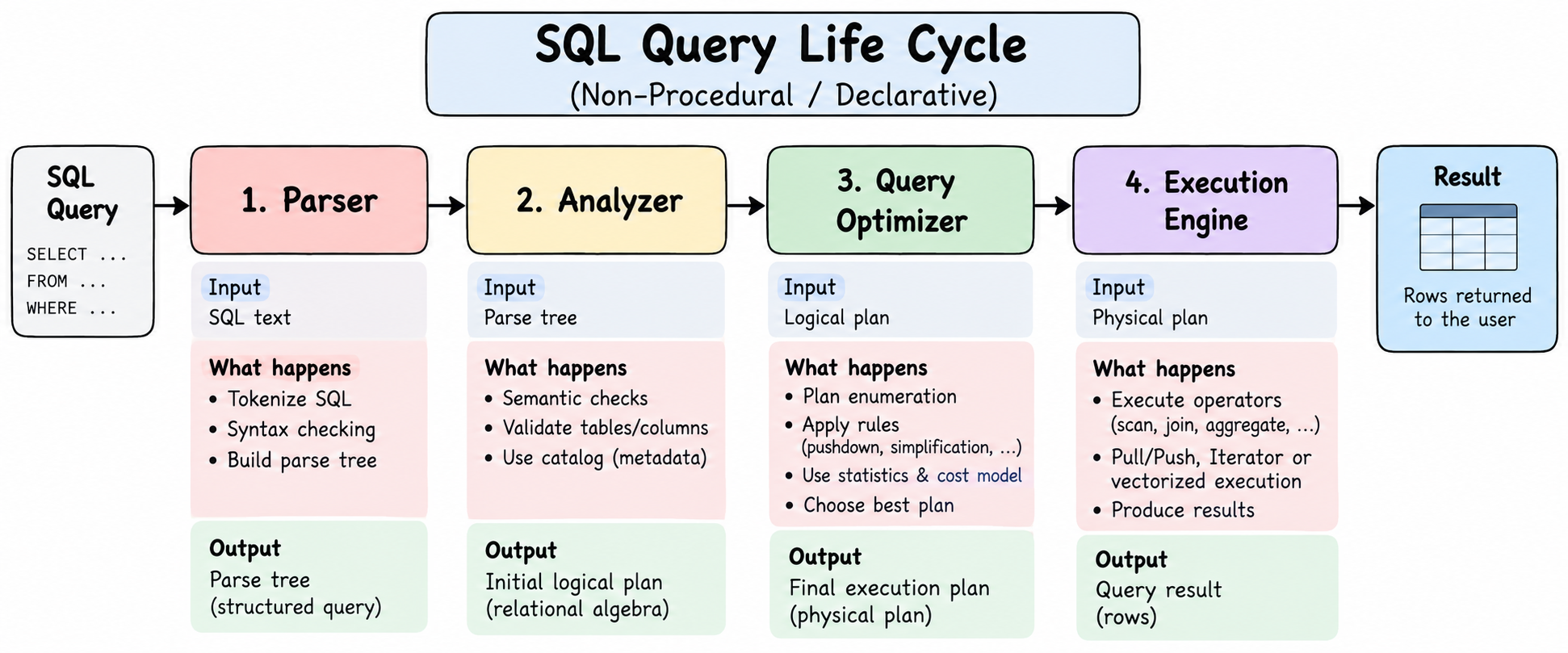
SQL Query Lifecycle --- Quick Canvas
Before going into the details, here is the whole lifecycle with the input and output of every phase:
┌───────────────────────────────────────────────────────────────┐
│ 1. PARSER                                                     │
│ Input:  SQL text                                              │
│        SELECT name FROM employees WHERE salary > 10000;       │
│                                                               │
│ Does:   Tokenization + syntax checking                        │
│ Output: Parse Tree / AST                                      │
└──────────────────────────────┬────────────────────────────────┘
                               ▼
┌───────────────────────────────────────────────────────────────┐
│ 2. ANALYZER                                                   │
│ Input:  Parse Tree / AST + Database Catalog                   │
│                                                               │
│ Does:   Semantic checks                                       │
│         - Do tables/columns exist?                            │
│         - Are types/references valid?                         │
│ Output: Analyzed query / Logical Query Plan                   │
└──────────────────────────────┬────────────────────────────────┘
                               ▼
┌───────────────────────────────────────────────────────────────┐
│ 3. QUERY OPTIMIZER                                            │
│ Input:  Logical Query Plan + Statistics + Catalog metadata    │
│                                                               │
│ Does:   Generate alternatives + apply rules + estimate costs  │
│         - Join order                                          │
│         - Scan method                                         │
│         - Join algorithm                                      │
│         - Aggregation / sorting strategy                      │
│ Output: Final Physical Execution Plan                         │
└──────────────────────────────┬────────────────────────────────┘
                               ▼
┌───────────────────────────────────────────────────────────────┐
│ 4. EXECUTION ENGINE                                           │
│ Input:  Physical Execution Plan                              │
│                                                               │
│ Does:   Execute physical operators                            │
│         Scan → Filter → Join → Aggregate → Sort ...           │
│ Output: Rows / Query Result                                   │
└──────────────────────────────┬────────────────────────────────┘
                               ▼
                         ┌──────────┐
                         │  RESULT  │
                         └──────────┘
Lifecycle in one table
Phase Input Main Job Output
Parser SQL text Tokenize and Parse Tree / AST check syntax
Analyzer Parse Tree + Check meaning, Analyzed / Catalog objects and types Logical Plan
Optimizer Logical Plan + Find a good way Physical statistics to execute it Execution Plan
Execution Physical Plan Run the selected Query Result Engine operators
SQL tells the database WHAT you want. The optimizer and execution engine decide HOW to get it.
1. Parser
The first component that receives our SQL is the Parser.
Its job is to understand the structure of the SQL statement.
For example:
SELECT name
FROM employees
WHERE salary > 10000;
The parser first breaks the SQL into tokens.
Token type Examples
Keywords SELECT, FROM, WHERE, UPDATE
Identifiers employees, name, salary
Operators >, <, =, +, -
Constants 10000, 'Amr'
Symbols (, ), ,
Then it performs syntax checking.
For example:
SELECT FROM employees;
is syntactically invalid.
The parser normally produces a structure called a Parse Tree or Abstract Syntax Tree (AST) representing the SQL statement.
SQL
 │
 ▼
Tokenization
 │
 ▼
Syntax Checking
 │
 ▼
Parse Tree / AST
At this point, however, the database still hasn't verified that things
such as employees or salary actually exist.
That's the next stage.
2. Analyzer
The Analyzer performs semantic analysis.
The parser asks:
"Is this valid SQL syntax?"
The analyzer asks:
"Does this SQL actually make sense inside this database?"
For example:
SELECT salary
FROM employees;
The analyzer checks things such as:
- Does the
employeestable exist? - Does the
salarycolumn exist? - Is the column accessible?
- Are the types compatible?
- Which schema/table does an identifier refer to?
To answer these questions, the analyzer uses the database Catalog.
The Catalog
The catalog is essentially a collection of database metadata.
It contains information about database objects rather than the actual application data.
For example:
Catalog
 ├── Schemas
 ├── Tables
 ├── Columns
 ├── Data Types
 ├── Indexes
 ├── Constraints
 └── Statistics
In PostgreSQL, for example, system catalogs include objects such as:
pg_namespace
pg_class
pg_attribute
pg_type
The analyzer uses this metadata to understand what the query references.
3. Logical Query Plan
After parsing and semantic analysis, the database can represent the query as a logical plan.
A logical plan describes what operations must happen, without deciding exactly how those operations will be implemented.
Consider:
SELECT department, COUNT(*)
FROM employees
WHERE salary > 10000
GROUP BY department;
A simplified logical plan might look like:
Aggregation
    │
Selection
    │
Table Scan
These operations are commonly represented using concepts from relational algebra.
Typical logical operators include:
Logical operation Meaning
Scan Read a relation/table Selection Filter rows Projection Select columns Join Combine relations Aggregation Calculate grouped values Sort Order results
The important point is that the logical plan still doesn't necessarily say how each operation will be executed.
4. Logical vs Physical Operators
This distinction becomes very important during optimization.
Logical Operator Possible Physical Implementation
Scan Sequential Scan Scan Index Scan Join Nested Loop Join Join Hash Join Join Merge Join Aggregation Hash Aggregate Aggregation Sort Aggregate
For example, logically we may simply need:
JOIN employees departments
But physically the database might choose:
Hash Join
or:
Nested Loop Join
So:
Logical plan = what operations are required.
Physical plan = exactly how those operations will run.
5. Query Optimizer
There are often many different ways to execute exactly the same SQL query.
Suppose we have:
SELECT *
FROM orders o
JOIN customers c
    ON o.customer_id = c.id
WHERE c.country = 'Egypt';
The database could:
Scan Customers
→ Filter Egypt
→ Join Orders
or:
Scan Orders
→ Join Customers
→ Filter Egypt
It could also choose different indexes and different join algorithms.
All of these could produce the same result, but their performance can be dramatically different.
The Query Optimizer tries to choose a good execution plan.
6. Plan Enumeration
The optimizer generates or considers alternative plans.
This process is often called plan enumeration.
Internally, alternatives can be represented using structures such as trees, DAGs, memo structures, or equivalent optimizer representations depending on the DBMS.
Conceptually:
                  Query
                    │
          ┌─────────┴─────────┐
          │                   │
       Plan A              Plan B
          │                   │
    Hash Join          Nested Loop
          │                   │
     Seq Scan            Index Scan
The number of possible plans can become enormous.
As the number of joined tables increases, the possible join orders increase very quickly.
Therefore, optimizers normally cannot blindly try every possible execution strategy for complex queries.
They use optimization rules, search strategies, statistics, and cost estimates to reduce the search space.
7. Rule-Based Optimization
Some optimizations are based on transformations that are generally beneficial.
This is rule-based optimization.
A classic example is predicate pushdown.
Instead of joining a huge number of rows and filtering afterward, the optimizer tries to apply a filter as early as possible when it is valid to do so.
Other common rules include:
- Predicate pushdown
- Projection pushdown
- Expression simplification
- Constant folding
- Empty subtree elimination
For example:
WHERE age > 25 AND 5 > 2
Since 5 > 2 is always true, the expression can potentially be
simplified.
8. Cost-Based Optimization
Rules alone aren't enough.
Sometimes there is no universally correct choice.
For example:
Sequential Scan
        VS
Index Scan
Which one is better?
It depends.
If we need most of a table, a sequential scan might be faster. If we need only a tiny fraction of the rows, an index scan might be dramatically faster.
This is where Cost-Based Optimization (CBO) comes in.
The optimizer estimates the cost of different plans and tries to choose a low-cost plan.
Decision Possible choices
Access path Sequential Scan / Index Scan
Join algorithm Nested Loop / Hash Join / Merge Join
Join order A → B → C / B → C → A / etc.
Aggregation Hash / Sort-based
Sorting Different sort strategies
Parallelism Serial / Parallel execution
9. Statistics and the Cost Model
How does the optimizer know which plan is cheaper?
It uses statistics.
Statistics may describe things such as:
Number of rows
Value distribution
Number of distinct values
NULL frequency
Histograms
Column statistics
The optimizer feeds these estimates into its cost model.
Statistics
    │
    ▼
Cost Model
    │
    ▼
Estimated Cost of Plans
    │
    ▼
Choose a Plan
For example:
Plan A → estimated cost: 150
Plan B → estimated cost: 800
Plan C → estimated cost: 230
The optimizer would likely choose Plan A.
These numbers generally represent estimated relative execution costs, not simply milliseconds.
Bad or outdated statistics can therefore cause the optimizer to make poor decisions.
10. Bottom-Up vs Top-Down Optimization
Optimizer search strategies can broadly be thought about in different ways.
Bottom-Up Top-Down
Builds alternatives from smaller Starts from the required result pieces
Can be simpler conceptually Can use required output properties
May generate unnecessary Can focus search based on alternatives requirements
Common in dynamic-programming-style Common in more advanced optimizer approaches frameworks
A top-down optimizer can use requirements from the parent operation.
For example, if the final output must already be sorted by:
ORDER BY created_at
an execution strategy that naturally provides the required ordering may become more attractive.
The exact optimizer architecture differs significantly between database systems.
11. Final Physical Execution Plan
After optimization, the database has a physical plan describing exactly which physical operators should execute.
For example:
HashAggregate
      │
   HashJoin
   /     \
IndexScan SeqScan
At this stage, decisions such as these have already been made:
Which index?
Which scan?
Which join algorithm?
Which join order?
Which aggregation strategy?
Should parallelism be used?
Now the plan can be handed to the Execution Engine.
12. Execution Engine
The Execution Engine runs the selected physical plan.
SQL
 ↓
Parser
 ↓
Analyzer
 ↓
Logical Plan
 ↓
Optimizer
 ↓
Physical Plan
 ↓
Execution Engine
 ↓
Result
The execution engine contains implementations of physical operators such as:
- Sequential Scan
- Index Scan
- Hash Join
- Nested Loop Join
- Sort
- Aggregate
Different database systems use different execution models for connecting and running these operators.
13. Iterator Model
One of the classic execution models is the Iterator Model, often associated with the Volcano model.
Each operator exposes an interface conceptually similar to:
next()
or:
getNext()
The parent asks its child:
Give me the next row.
For example:
LIMIT
  │
  ▼
FILTER
  │
  ▼
SCAN
Execution can look like:
LIMIT asks FILTER for a row
FILTER asks SCAN for a row
SCAN returns one row
FILTER checks it
FILTER returns it
LIMIT receives it
Then the process repeats.
Advantages
- Simple implementation
- Naturally supports pipelining
- Can produce results early
- Can stop work early with operations such as
LIMIT - Doesn't require the entire result to live in memory
Disadvantages
- Many function calls
- Row-at-a-time execution introduces overhead
- Some operators are blocking
A hash join, for example, may need to build a hash table before it can produce results from part of the operation.
14. Vectorized / Batch Execution
Instead of returning one row per call, a vectorized engine processes batches of rows.
Iterator:

getNext()
→ 1 row


Vectorized:

getNextBatch()
→ N rows
Iterator Vectorized
One row at a time Batch of rows
More function-call overhead Fewer calls
Simple implementation More complex
Good pipelining Good pipelining
Often slower for analytical Often excellent for analytics workloads
Traditionally common in OLTP Common in analytical/vectorized engines engines
Processing a batch allows the CPU to perform the same operation over many values efficiently and can improve cache locality and CPU utilization.
15. Materialization Model
Another approach is materialization.
Instead of returning one row or one batch, an operator may compute its complete result and return or store that result.
Operator
   │
   ▼
Process Everything
   │
   ▼
Materialized Result
Iterator Vectorized Materialization
One row Batch of rows Entire intermediate result
Low memory requirement Moderate Potentially high
Many calls Fewer calls Few calls between stages
Good pipelining Good CPU efficiency Simple stage boundaries
Common general-purpose Excellent for Can be useful for model analytical processing small/intermediate results
Materialization can become expensive when intermediate results are very large.
16. Pull-Based Execution
Iterator-style execution is commonly pull-based.
The parent operator asks its child for data.
Parent
  │
  │ "Give me data"
  ▼
Child
So execution is driven from the top of the plan downward.
Result
  │ pull
Filter
  │ pull
Scan
Advantages include simplicity and natural control over how much data is requested.
A LIMIT 10, for example, can stop requesting rows after it receives
enough.
A traditional pull-based iterator pipeline is usually executed synchronously within a thread unless the DBMS adds parallel execution separately.
17. Push-Based Execution
In a push-based model, operators produce data and push it toward the next operator.
Scan
 │
 │ push
 ▼
Filter
 │
 │ push
 ▼
Result
Rather than the parent repeatedly asking for the next row, the child invokes or transfers data toward its consumer.
Pull-Based Push-Based
Parent requests data Child sends data
Natural iterator model Data-driven execution
Simple control flow More complex coordination
Easy early stopping Early stopping can require explicit coordination
Often straightforward to implement Can fit parallel/dataflow architectures well
Push vs pull does not by itself determine whether execution is parallel. A database can build parallel execution mechanisms around either model.
18. Blocking vs Non-Blocking Operators
Not every operator can immediately return output.
Some operators can stream data:
Scan
Filter
Projection
These are often pipeline-friendly operators.
Other operators may need significant input before producing output.
Examples include:
Sort
Hash-table build phase
Some aggregations
These are often called blocking operators or pipeline breakers.
For example, a hash join may first need to:
Read build-side rows
       ↓
Build Hash Table
       ↓
Probe Hash Table
       ↓
Return Matches
So execution may pause at that stage until the required internal structure has been created.
19. EXPLAIN
SQL databases usually provide a way to inspect the plan selected by the optimizer.
In PostgreSQL:
EXPLAIN
SELECT *
FROM users
WHERE id = 10;
This shows the planned execution strategy without normally executing the query itself.
You might see:
Index Scan using users_pkey on users
instead of:
Seq Scan on users
This lets us see what the optimizer decided.
20. EXPLAIN ANALYZE
EXPLAIN ANALYZE goes further.
EXPLAIN ANALYZE
SELECT *
FROM users
WHERE id = 10;
The important difference is that the query is actually executed.
EXPLAIN EXPLAIN ANALYZE
Shows planned execution Executes the query
Uses optimizer estimates Shows actual runtime measurements too
Useful for understanding the chosen Useful for diagnosing performance plan
Safer for statements you don't want Must be used carefully with executed modifying queries
PostgreSQL also provides additional options such as:
EXPLAIN (ANALYZE, VERBOSE, BUFFERS)
SELECT ...;
VERBOSE exposes additional plan details, while BUFFERS can show
buffer activity and is especially useful during performance
investigation.
Putting Everything Together
                 SQL QUERY
                     │
                     ▼
              ┌─────────────┐
              │   Parser    │
              └─────────────┘
                     │
              Tokens + Syntax
                     │
                     ▼
              Parse Tree / AST
                     │
                     ▼
              ┌─────────────┐
              │  Analyzer   │◄──── Catalog
              └─────────────┘
                     │
             Semantic Checks
                     │
                     ▼
              Logical Plan
                     │
                     ▼
          ┌────────────────────┐
          │  Query Optimizer   │
          └────────────────────┘
             │             │
             │             │
       Rule-Based      Cost-Based
       Optimization    Optimization
             │             │
             └──────┬──────┘
                    │
             Plan Enumeration
                    │
               Statistics
                    │
               Cost Model
                    │
                    ▼
          Physical Execution Plan
                    │
                    ▼
          ┌──────────────────┐
          │ Execution Engine │
          └──────────────────┘
                    │
        Iterator / Vectorized /
          Push / Pull / etc.
                    │
                    ▼
                  RESULT
The Core Mental Model
SQL says WHAT you want.

Parser understands the SQL.

Analyzer checks WHAT the SQL refers to.

Logical Plan describes WHAT operations are needed.

Optimizer decides HOW to perform them efficiently.

Physical Plan describes HOW they will actually run.

Execution Engine runs that plan.

Result comes back to you.
That separation between WHAT and HOW is one of the most important ideas behind relational databases.